Logo of MyStyleGuide.io, a platform for sharing style guides and branding resources.

Brand Manager

Your hub for creating and managing all your brand guides.

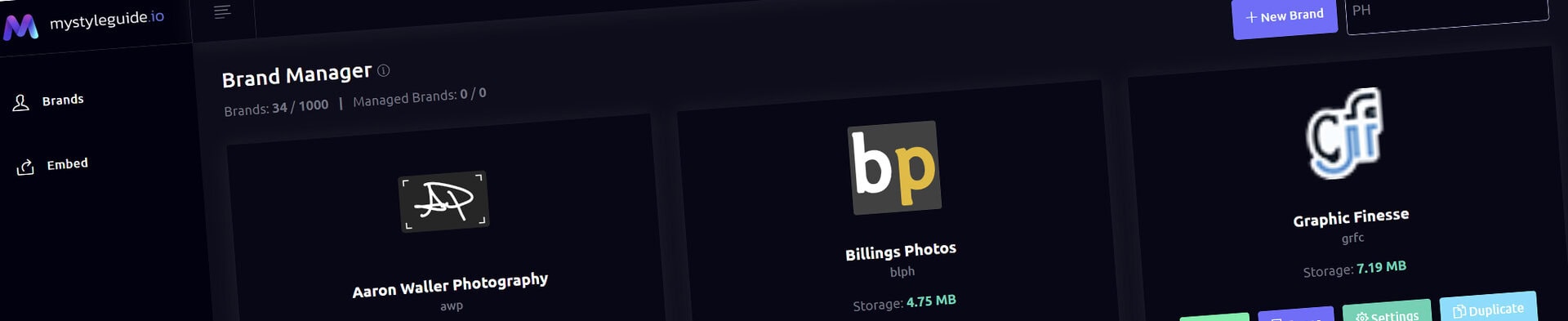
The Brand Manager is the starting point for building your digital brand guides in MyStyleGuide.io. This is where you create new brands, access existing ones, and manage everything related to your guides — all in one clean, visual dashboard.

🌟 What You Can Do Here

The Brand Manager lets you:

  • Create a new brand guide
  • Open any brand you own or manage
  • View your brand’s public link
  • Access your brand’s pages and settings
  • Duplicate an existing brand
  • Delete a brand you no longer need
  • Quickly search and filter your brand list
  • Monitor storage usage for each brand

Everything is designed to be simple, intuitive, and fast — even if you’re managing multiple brands or clients.

🧭 Understanding the Brand Cards

Each brand appears as a card with helpful information:

Brand Icon

If your brand has a favicon uploaded, it appears here. Otherwise, a default placeholder is shown.

Brand Name + Slug

The name you set in your brand settings, plus the internal slug used for your URL.

Role Badge

If your brand is shared with another user you’ll see one of the following:

  • Managed — you own the brand and have added managers
  • Manager — you’re a manager on someone else’s brand

This helps teams quickly understand who controls what.

Storage Usage

Each card shows how much storage the brand is using. This includes images, uploads, and files inside the guide.

➕ Creating a New Brand

Click New Brand to start a fresh guide.

You’ll enter a brand name, and MyStyleGuide.io will automatically:

  • Create a new brand workspace
  • Generate all the folders and structure you need
  • Set you as the brand owner
  • Prepare your brand settings and pages

Once created, you can immediately begin customizing your guide.

🔍 Filtering Your Brands

If you manage many brands, use the Filter Brands search bar.

Just start typing — the list updates instantly so you can find what you need without scrolling.

📄 Managing a Brand

Each brand card includes quick‑access buttons:

View Public

Opens the public version of your brand guide — the link you share with clients, teammates, or collaborators.

View Pages

Takes you to the Page Manager, where you build and organize the sections of your guide.

Settings

Opens your brand’s settings panel, where you can update:

  • Brand name
  • Description
  • Favicon
  • Theme
  • SEO fields
  • Password protection
  • And more

📑 Duplicating a Brand (Owners Only)

If you want to reuse a brand as a template or create a variation, you can duplicate it.

When you duplicate a brand:

  • All pages, settings, uploads, and structure are copied
  • You choose the new brand’s slug
  • You become the owner of the duplicate

This is perfect for agencies, designers, and teams who build similar guides for multiple clients.

🗑 Deleting a Brand (Owners Only)

Owners can permanently delete a brand.

You’ll be asked to confirm before anything is removed.
Once deleted, the brand and all its content are gone — so use this carefully.

👥 Owners vs. Managers

MyStyleGuide.io supports collaborative brand management.

You’ll see brands where:

  • You are the owner
  • You have been added as a manager

Editors can help build and maintain a brand guide, but only owners can duplicate or delete it.

🎯 Summary

The Brand Manager is your command center for everything related to your brand guides. It’s designed to be:

  • Simple
  • Visual
  • Fast
  • Team‑friendly

From here, you can create new guides, manage existing ones, collaborate with others, and keep your brand ecosystem organized.

More Tutorials

See All Tutorials
Modern, colorful MyStyleGuide.io logo with a sleek "M" design.

Sharing your brand just got easier

MyStyleGuide.io helps teams prevent off‑brand mistakes by giving everyone a single, reliable place to access your brand assets and guidelines. Built with thoughtful design and real‑world branding experience, it makes communicating your identity simple, consistent, and effortless
© 2023 - 2026 MyStyleGuide.io
  |  
Website Design by: 
Graphic Finesse