Logo of MyStyleGuide.io, a platform for sharing style guides and branding resources.
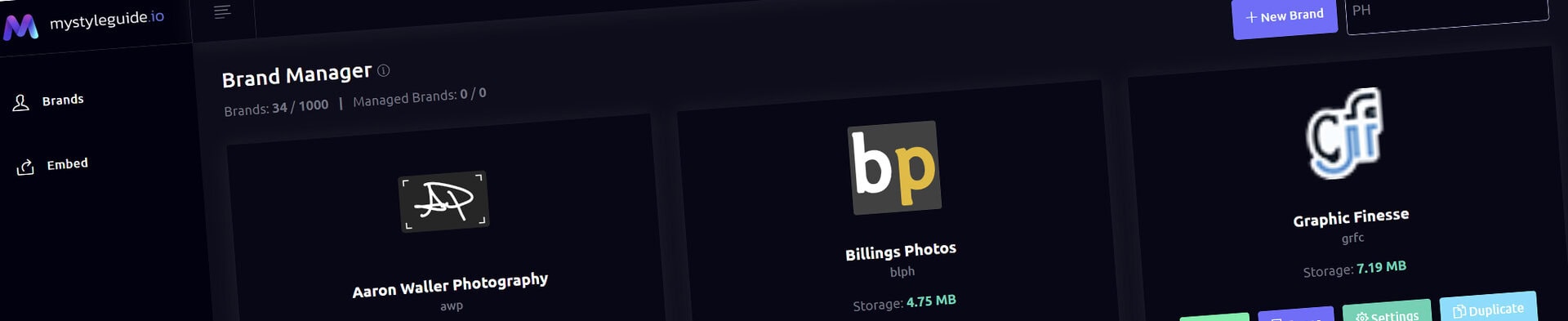
Screenshot of MyStyleGuide.io platform showing brand assets and organization tools.

Brand Manager

Your hub for creating and managing all your brand guides.

Brand Manager

The Brand Manager is your dashboard for creating, organizing, and managing every brand in MyStyleGuide.io. Whether you're building a guide for yourself, your team, or a client, this is where everything begins.

What You Can Do

From the Brand Manager, you can:

  • Create a new brand
  • Open any brand you own or manage
  • Preview draft brands
  • View published brands
  • Monitor each brand's publication status
  • Access your pages and settings
  • Duplicate an existing brand
  • Delete brands you no longer need
  • Search and filter your brands
  • Monitor storage usage

Everything is designed to help you find what you need quickly—even if you're managing dozens of brands.


Understanding Brand Cards

Each brand is displayed as a card containing important information and quick actions.

Brand Icon

If you've uploaded a favicon, it appears here. Otherwise, a default icon is displayed.

Brand Name & Slug

The card shows your brand's name along with its URL slug, which is used to create your public guide link.

Publication Status

Each brand displays its current publication status.

Draft brands are still being developed and are only available to users with editing permissions.

Published brands are live and available to anyone with permission to view the guide.

Role Badge

If a brand is shared with other users, you'll see your role.

  • Owner — You own and control the brand.
  • Manager — You've been granted management access by the owner.

This makes it easy to see which brands you control and which you've been invited to manage.

Storage Usage

Each card displays the amount of storage being used by that brand, including uploaded images, files, logos, and other assets.


Creating a New Brand

Click New Brand to create a new guide.

After entering a brand name, MyStyleGuide.io automatically:

  • Creates a new brand workspace
  • Generates the required folder structure
  • Assigns you as the owner
  • Creates the default settings and pages

New brands are created as Drafts, allowing you to build and review your guide before publishing it.

Once the process is complete, you can immediately begin customizing your guide.


Finding a Brand

If you manage multiple brands, use the Filter Brands search box.

Simply start typing a brand name and the list updates instantly, making it easy to find exactly what you're looking for.


Brand Actions

Each brand card includes quick-access actions.

Preview

Opens a preview of your brand guide.

Preview allows owners and managers to review draft brands exactly as they'll appear before publishing.

View

For published brands, the View button opens the live version of your guide—the same experience your clients, teammates, or collaborators will see.

View Pages

Opens the Page Manager, where you create, organize, and manage the pages that make up your guide.

Settings

Manage your brand's configuration, including:

  • Brand name
  • Description
  • Favicon
  • Theme
  • SEO settings
  • Publication status
  • Password protection
  • Additional brand options

Duplicating a Brand

Owners can duplicate an existing brand to use as a starting point for a new project.

Duplicating a brand copies:

  • Pages
  • Settings
  • Images and uploads
  • Components
  • Overall structure

Duplicated brands are created as Drafts, allowing you to customize and review them before publishing.

You'll choose a new URL slug, and the duplicated brand becomes a completely separate guide that you own.

This is especially useful for agencies and teams creating guides for multiple clients.


Deleting a Brand

Only the Owner of a brand can delete it.

Before deletion, you'll be asked to confirm your decision.

Deleting a brand permanently removes all pages, uploads, settings, and associated files. This action cannot be undone.


Owners and Managers

MyStyleGuide.io supports collaboration by allowing multiple users to manage the same brand.

Owner

The Owner has full control and can:

  • Edit the guide
  • Manage pages
  • Update settings
  • Publish and unpublish the brand
  • Duplicate the brand
  • Delete the brand
  • Add or remove managers

Manager

Managers can help build and maintain a guide by:

  • Editing content
  • Managing pages
  • Updating settings
  • Previewing draft brands
  • Publishing and unpublishing the brand

Managers cannot duplicate or permanently delete a brand.


Summary

The Brand Manager is the central hub for your entire MyStyleGuide.io workspace.

From here you can create new brands, organize existing guides, monitor publication status, preview draft brands, access published guides, collaborate with teammates, and quickly access everything you need to keep your brand documentation up to date.

Modern, colorful MyStyleGuide.io logo with a sleek "M" design.

Sharing your brand just got easier

MyStyleGuide.io helps teams prevent off‑brand mistakes by giving everyone a single, reliable place to access your brand assets and guidelines. Built with thoughtful design and real‑world branding experience, it makes communicating your identity simple, consistent, and effortless
© 2023 - 2026 MyStyleGuide.io
  |  
Website Design by: 
Graphic Finesse