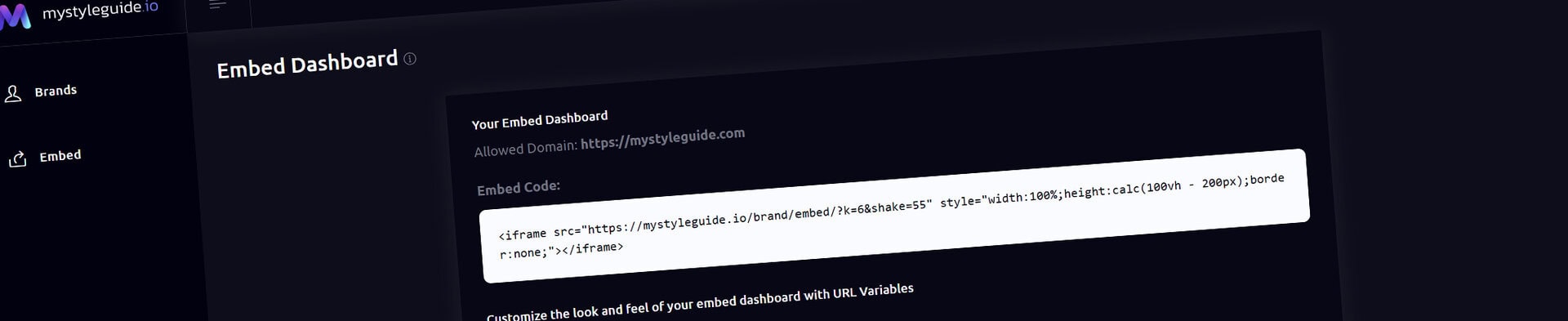
The Embed Dashboard lets you display a live, interactive version of your brand guide inside another website. Whether you're embedding it into a client portal, company intranet, project management system, or design system, your guide remains fully functional while maintaining secure access.
Each Embed Dashboard is protected with a unique embed key and can be restricted to a specific domain for added security.
From the Embed Dashboard, you can:
The result is a seamless brand guide experience that feels like part of your own website.
If you haven't created an Embed Dashboard yet, you'll be prompted to generate one.
Simply enter the domain where the guide will be embedded, then click Generate Embed Dashboard.
Examples include:
Only the specified domain will be allowed to display your embedded guide.
Once your Embed Dashboard has been created, you'll receive a ready-to-use iframe snippet.
Copy and paste this code into your website, client portal, CMS, or internal documentation system.
The embedded guide remains connected to your MyStyleGuide.io brand, so updates you make are reflected automatically.
The Embed Dashboard can be visually customized to better match the website where it's appears.
Appearance options are controlled through URL parameters included with your embed link.
Available options include:
| Parameter | Controls |
|---|---|
bg | Background color |
text | Primary text color |
card_bg | Card background color |
card_text | Card text color |
btn | Button background color |
btn_hover | Button hover color |
btn_text | Button text color |
For example:
?bg=152733
&text=EFF7FD
&card_bg=11212C
&card_text=E0F0FA
&btn=49A2DA
&btn_hover=3997D2
&btn_text=EFF7FD
This allows the embedded dashboard to blend naturally into your website while still displaying the latest content from your brand guide.
Tip: Colors should be entered as six-character HEX values without the
#symbol.
Every Embed Dashboard is designed with security in mind.
Each embed:
If an embed key is deleted, all existing embeds immediately stop working until a new key is generated.
If you no longer need an embedded guide, click Delete Embed Dashboard.
Deleting the dashboard:
This is useful if you need to move the embed to a different domain or rotate your embed credentials.
Owners and Managers can create and manage Embed Dashboards for a brand.
Users with view-only access cannot generate or manage embed keys.
The Embed Dashboard makes it easy to integrate your brand guide into the tools your team already uses.
From secure domain restrictions to customizable colors, you can create an embedded experience that feels like a natural extension of your own website while always displaying the latest version of your brand documentation.