Logo of MyStyleGuide.io, a platform for sharing style guides and branding resources.
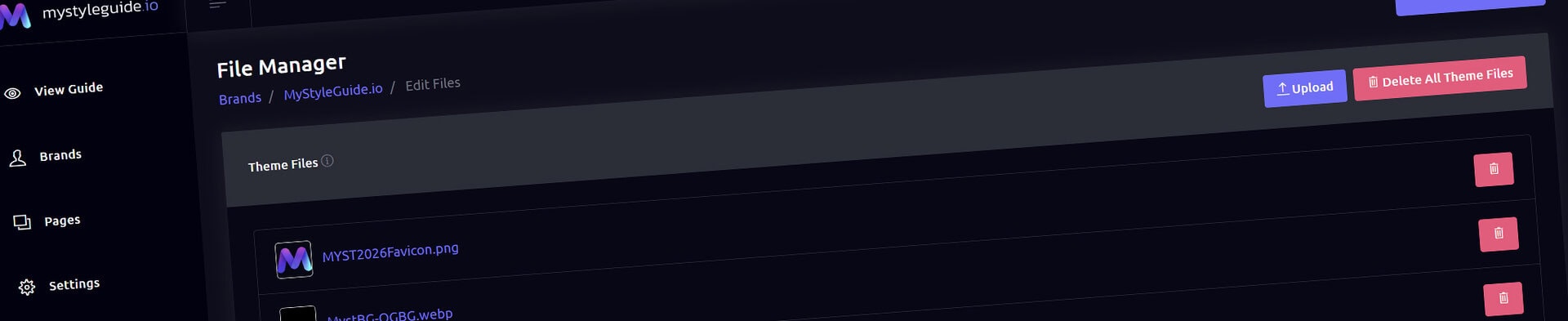
Screenshot of the File Manager interface on MyStyleGuide.io platform.

File Manager

Upload, organize, and download all brand assets in one place.

File Manager

The File Manager is your centralized asset library for every file associated with a brand. Store logos, fonts, color swatches, brand guides, textures, media, and other supporting files in one organized location.

Whether you're managing a single brand or an entire client portfolio, the File Manager helps keep your assets organized, accessible, and easy to share.


What You Can Do

From the File Manager, you can:

  • Upload brand assets
  • Upload theme images and media
  • Browse files by category
  • Download individual files
  • Download all assets as a ZIP archive
  • Delete individual files
  • Clear an entire category of files

Everything is organized to help you quickly find the assets you need.


Theme Files

Theme Files are assets used by your brand's visual theme.

Examples include:

  • Navigation logos
  • Favicons
  • Background images
  • Theme graphics
  • Videos used by your theme

From this section you can:

  • Upload new theme assets
  • Download existing files
  • Remove individual files
  • Clear all theme files when needed

Theme Files are available throughout the Theme Manager whenever you need to assign images or media to your brand.


Brand Files

Brand Files store the assets that support your brand guide.

Files are organized into categories for easy management.

Logos

Store master logo files in a variety of formats, including:

  • AI
  • PDF
  • SVG
  • PNG
  • JPG
  • WEBP

Keeping multiple formats together makes it easy to provide the right asset for every use case.


Fonts

Upload the font files associated with your brand.

These files can be stored alongside your documentation for easy distribution to designers, developers, and marketing teams.


Color Swatches

Store color resources used by design applications.

This is an ideal place for:

  • ASE files
  • ACO files
  • Brand color references

Textures

Organize background textures, patterns, and supporting graphic assets used throughout your brand.


Brand Guides

Store supporting documentation such as:

  • PDF brand guidelines
  • Presentation files
  • Brand reference documents

Media

Keep supporting images and videos together in one location for easy access throughout your guide.


Uploading Files

Uploading assets is quick and organized.

Upload Theme Files

Use this option when adding images or videos that will be used by your visual theme.

Examples include logos, favicons, and background images.


Upload Brand Files

Use this option for all supporting brand assets.

Simply choose the appropriate category, and MyStyleGuide.io organizes the file for you.


Downloading Files

Every file includes its own download link, allowing you to retrieve individual assets whenever needed.

Need everything?

Choose Download All Files to generate a ZIP archive containing every asset associated with your brand.

This is especially useful for:

  • Delivering assets to clients
  • Creating backups
  • Archiving projects
  • Migrating to another system

Managing Files

Files can be managed individually or by category.

Delete a File

Remove a single asset when it's no longer needed.

You'll be asked to confirm before the file is permanently deleted.


Delete All Files

Each category also includes an option to remove every file within that category.

Because this action permanently deletes multiple assets, you'll be asked to confirm before continuing.


Permissions

Owners and Managers can upload, organize, download, and remove files.

Users with view-only access can browse published brand guides but cannot access the File Manager or modify brand assets.


Summary

The File Manager keeps every asset associated with your brand organized in one place.

From logos and fonts to color swatches, media, and supporting documentation, it provides a structured, centralized library that makes managing and sharing brand assets simple for individuals, agencies, and teams.

Modern, colorful MyStyleGuide.io logo with a sleek "M" design.

Sharing your brand just got easier

MyStyleGuide.io helps teams prevent off‑brand mistakes by giving everyone a single, reliable place to access your brand assets and guidelines. Built with thoughtful design and real‑world branding experience, it makes communicating your identity simple, consistent, and effortless
© 2023 - 2026 MyStyleGuide.io
  |  
Website Design by: 
Graphic Finesse